Below, we have a series of articles where we will explain how to subscribe to, configure the BASIC PLAN of Revo INTOUCH, and example videos on how it works.
1. SUBSCRIPTION: REVO INTOUCH 2. CONFIGURATION: FORMULARIO PLAN FIDELIZACIÓN BASIC 3. CONFIGURATION: FORMULARIO PLAN FIDELIZACIÓN PLUS 4. CONFIGURATION: FORMULARIO WALLET PASS 5. TRAINING: FORMULARIO REGISTRO 6. TRAINING: INTEGRACIÓN REVO SOLO 7. TRAINING: INTEGRACIÓN REVO XEF 8. TRAINING: BACK-OFFICE REVO INTOUCH 9. PUNCH CARD 10. OTHER FEATURES 11. MORE INFORMATION
1. SUBSCRIBE TO REVO INTOUCH
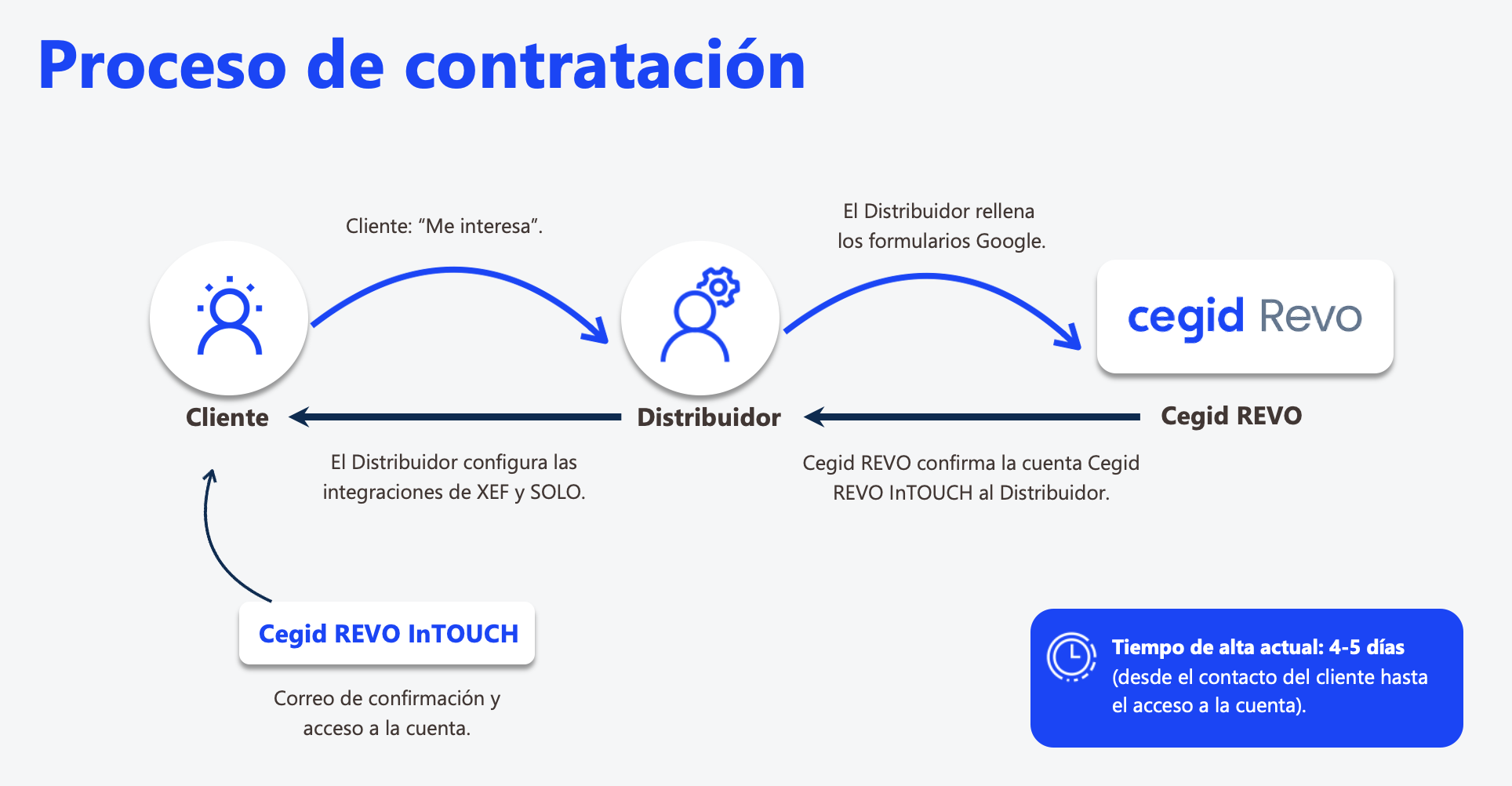
To subscribe to Revo INTOUCH, we need to contact our distributor, and they will send us the forms to set up our loyalty club.
You will receive two Google forms: one to set up the WalletPass and another to configure the loyalty club.
Once the forms are completed, you will receive an email with the following information:
-
API Key, to integrate with Revo XEF and Revo SOLO applications.
-
Username and password to access the Revo INTOUCH back-office.
IMPORTANT: Activating the loyalty club can take up to 48 hours.
2. CONFIGURATION: BASIC LOYALTY PROGRAM FORM
Click here to access the article on configuring the Loyalty Basic Club.
3. CONFIGURATION: PLUS LOYALTY PLAN FORM
Click here to access the article on how to set up Loyalty Plus Club.
4. CONFIGURATION: WALLETPASS FORM
Click here to access the article on configuring the WalletPass.
5. TRAINING: REGISTRATION FORM
Click here to access the training on the registration form.
6. TRAINING: REVO SOLO INTEGRATION
In the following links, you will find all the necessary training to set up integration with Revo SOLO and its operation:
7. TRAINING: REVO XEF INTEGRATION
In the following links, you will find all the necessary training to set up integration with Revo XEF and its operation:
8. TRAINING: REVO INTOUCH BACK-OFFICE
In the following links, you will find the necessary training to correctly use the Revo INTOUCH back-office:
9. PUNCH CARD
10. OTHER FEATURES
-
Print QR code ticket
-
Credit Report
-
Specific Campaigns for SOLO Orders
-
Specific Campaigns for XEF Accounts
-
WalletPass
-
Smart Surveys
-
Coupon Codes
11. MORE INFORMATION
For more information on Revo InTOUCH features, please visit the Revo InTOUCH support portal InTOUCH , where you will find additional documentation about the platform and its features..